
The simple round app for window cleaners.
See today’s jobs, tick them off as you go, and know who’s paid and who still owes you.
On your phone. £7.99 a month.
No card needed. Cancel any time.

How it works
-
Open it
Today’s jobs are already there, in your round order. No planning first.
-
Tap when it’s done
Tap the job, then Mark done. It goes straight on the bill.
-
See who owes you
Every clean you mark done goes on the owing list. Mark it paid when the money comes in.
What window cleaners say, in their own words.
Read them on Trustpilot →Every one of these was left without being asked for, by a working cleaner running their own round.
"Just upload and it was all there."
On moving a round over from a spreadsheet. "Literally takes a lot of the faff out of the admin side of the business."
"I've used another window cleaning app before and this one beats it hands down."
On getting help: "the answers are only an email away, next day reply."
"Keeps you informed, takes the stress away."
"Very user friendly. Helps you to manage your work load."
Simple Import
Bring your round across from whatever you use now. It takes minutes.
Export from the app you’re on, or take your spreadsheet exactly as it is, and drop the file in. The importer works out for itself which is the name, the address, the price and how often each customer is due. Nothing to map by hand, nothing to reformat, no template to fill in first.
There’s no big switchover day, either. Your old app or spreadsheet carries on exactly as it is, so you can try RoundWiz alongside it and move across when you’re ready.
-
Bring what you already have
A spreadsheet, or an export from Squeegee, Cleaner Planner or getSoapy. Any layout, any number of tabs. Only got it on paper? Add your first few by hand, or start from a blank template.
-
Drop it in
The importer reads the file and tidies it up for you. Names, addresses, prices and how often each customer is due.
-
Check it, then it is live
You see exactly what it matched before a single thing is saved. Confirm, and the round is running with your names on it.
"Just upload and it was all there."
Import it as many times as you like. Nothing is permanent.
If it comes in wrong, delete the lot and start again. Try it with ten customers first if you would rather. There is no one-shot import you can ruin, no support ticket to raise, and nothing you can break. That is the whole reason it is safe to just have a go.
And once you are in, if your spreadsheet turns out to be a proper mess, send it to support and I’ll run it through for you myself.
Nothing is lost, and nothing is switched off
Importing takes a copy. Your spreadsheet, or your Squeegee, Cleaner Planner or getSoapy account, carries on exactly as it is. Run the two side by side for a few weeks and stay on whichever you trust. Cancel nothing until you are sure.
One thing to know: they do not talk to each other. Once you have decided, tick your cleans off in one place only.
Still on George?
In George, go to System, then Merge/Export, choose Jobs and export the CSV. Drop that file in here and check what it matched. George carries on exactly as it is on your PC, so run the two side by side until you’re happy.
If the file doesn’t come in right, send it to support and I’ll run it through myself. And once your round is in, it isn’t tied to one computer any more, so a dead hard drive doesn’t take it with it.

30-day trial, no card needed.
Already signed up and stuck? Send your file to support and I’ll run it through myself, usually back within a day or two.
Fallen behind?
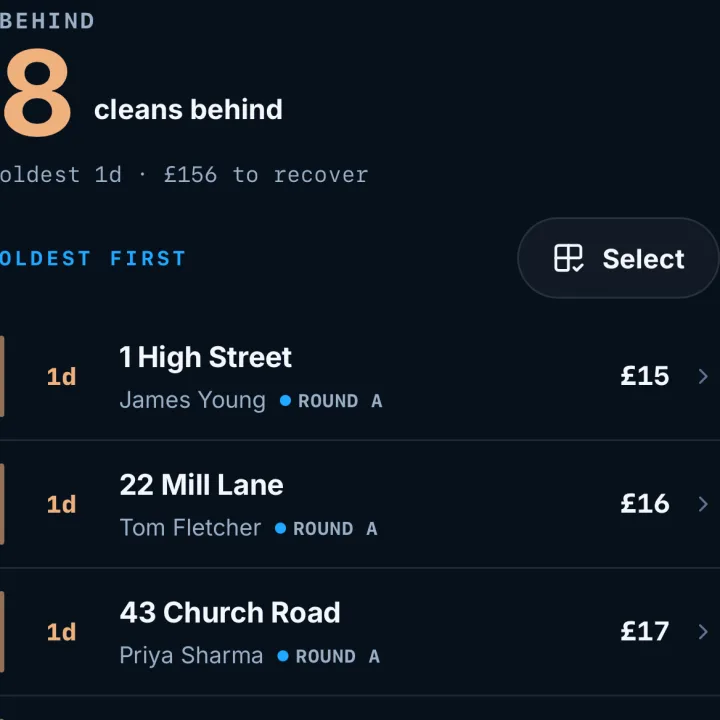
Rain, a holiday, a bad back. Missed cleans wait in one list, oldest first, so nothing gets forgotten. When you are ready to catch up, pick a day and move them across in one go.
The three things people ask before they move.
"I'm not great with computers."
It is built to be the simple one. No setup wizard, no dashboard to configure. Put your customers in, say how often each is due, and the round comes back round on its own. If you can keep a paper diary you can run this. If you get stuck, email support and you’ll get me, the person who built it, usually the same day.
"What if it does not do something my current app does?"
Possibly not yet. RoundWiz does the round and the money, and it does those without you having to set anything up. Squeegee and Cleaner Planner carry a lot more besides, and if you genuinely use all of it they are good tools. But if you have been paying for thirty screens and opening four, run both for a fortnight. You will know soon enough which one you actually reach for at the gate.
"Moving hundreds of customers sounds like a nightmare."
It is the thing people put off for years, and it is why the importer exists. Most rounds go in one go: upload the file, check what it matched, done in minutes. If it comes in wrong you delete it and go again, and if the file is a proper mess, start the trial and send it to support. I’ll run it through for you.
Stuck? You’ll get me.
I’m Simon. I built RoundWiz here in Essex, and when you email support, I’m the one reading it. Ask how to set up a round, ask why something’s gone wrong, ask the same thing twice. It costs nothing extra.
You’re also thinking of putting four hundred customers into software made by someone you’ve never met, so here’s what you can count on.
Your round is never locked in here
Export every customer, every clean and every payment whenever you like, in a file you can open. If RoundWiz stopped tomorrow you would still have your round.
Your money never passes through me
Collections run through your own GoCardless account and pay out to your own bank. RoundWiz never holds a penny of it, so none of your money is ever sitting with me.
You can check up on me
The release notes are public and dated, and the Trustpilot reviews are not mine to edit. Check both rather than take my word for it.
I’ve got thirty years of software behind me, and I built RoundWiz alongside working window cleaners. The round software already out there was built for companies with staff, but most of this trade is one person and a van. That’s who I build for, which is why the app is simple and why, when you ask for help, you get me rather than a script.
Asked at the gate
Does it work on iPhone, Android and tablets?+
Yes. RoundWiz runs on anything with a browser and installs to your home screen like an app. iPhone, Android, tablets, and the computer at home for the admin.
I'm not great with tech. Will I get on with it?+
It is built to be the simple one. No long setup wizard to sit through and no dashboard to configure: put your customers in, say how often each one is due, and the round comes back round on its own. If you can keep a paper diary you can run this, and if you do get stuck, email support and you'll get me, the person who built it.
I've got hundreds of customers in a spreadsheet. How long does moving really take?+
Most rounds import in one go: upload the file, check what it matched, done in minutes. An export from the app you use now works the same way as a spreadsheet. Multi-sheet workbooks and OpenOffice files work too, and your round names come across exactly as you wrote them.
Can I try it without giving up what I use now?+
Yes, and that is how most people start. Import a copy of your round, leave the app or spreadsheet you use now exactly as it is, and run the two side by side for a few weeks until you trust it. Nothing switches off at your end and the trial needs no card. They are not talking to each other, though, so once you are happy, tick your cleans off in one place and not two.
I'm still on George. Can I bring my round across?+
Yes. In George, go to System, then Merge/Export, choose Jobs and export the CSV. Drop that file into the importer and check what it matched. George carries on exactly as it is on your PC, so run the two side by side until you’re happy. If the file doesn’t come in right, send it to support and I’ll run it through myself. And once your round is in, it isn’t tied to one computer any more, so a dead hard drive doesn’t take it with it.
I'm not a window cleaner. Can I still use it?+
Yes. It is built for window cleaners and similar round-based trades, so if you run a round of any kind, the same screens fit: gutter clearing, softwashing, cleaning contracts, anything that repeats on a schedule. It will feel most at home if you clean windows, because that is who it was built with.
What happens when I fall behind?+
Missed cleans collect on the Behind screen with the total to recover. Pick a day, move them across in a batch, and the schedule takes it from there.
Customers on different schedules?+
Yes. 4-weekly, 6-weekly, every 2 months on a fixed day, one-offs, and everything between. Fixed-day rounds keep streets together; flexible rounds let each customer run to their own rhythm.
Is there a contract?+
No. Monthly rolling, cancel in the app, and you can export your full customer list any time. The free trial needs no card.
Who's behind it?+
Me, Simon. I build RoundWiz in Essex, with thirty years of software behind me, and I make it in the open alongside working window cleaners. Improvements ship most weeks, the release notes are public, and when you email support, I'm the one who answers.
Try it with your own round.
Upload your round, check it, and it’s running. Get it wrong and you delete it and go again, so there’s nothing to be nervous about. Keep whatever you use now until you’re sure.
No card needed to start. No setup fee, no per-customer fees, and the help’s free. Cancel any time.